A ticket gets resolved in four reassignments, three "can you clarify" comments, and two days longer than it should have taken. The customer rates it 5 stars anyway — the problem is gone, so on a satisfaction scale, it reads as a win. CSAT just told you nothing about how painful that resolution actually was.
This is the blind spot Customer Effort Score exists to close. CSAT asks "were you happy with the outcome?" CES asks "how hard did you have to work to get there?" — and for a service desk, effort is often the leading indicator, not satisfaction. A customer can be satisfied with a fix today and still churn next quarter because every interaction with your team feels like a chore.
The problem is that most JSM admins never set CES up, because it isn't sitting there waiting for them the way CSAT and NPS are.
Why CES Gets Skipped
If you've configured feedback collection in JSM before, you've probably noticed that CSAT and NPS feel like they come for free — because with a tool like Myra, they do. Myra generates a built-in CSAT and NPS survey automatically for every space, pre-wired with default collection rules, ready to go the moment you install the app. They're even locked against deletion or renaming, specifically so every team has a consistent baseline metric without configuration.
CES doesn't get that treatment — in Myra or anywhere else. It's a custom survey you have to define yourself: the question, the scale, the scope, the trigger. That extra step is exactly why so many service desks track CSAT for years and never get around to effort.
The result is a gap in the data. Teams can tell you whether customers were happy, but not whether the process to get there was efficient or exhausting. When escalations and reopens climb, there's no effort metric to point to as an early warning — just a satisfaction score that often looked fine right up until it didn't.
Building a CES Survey From Scratch
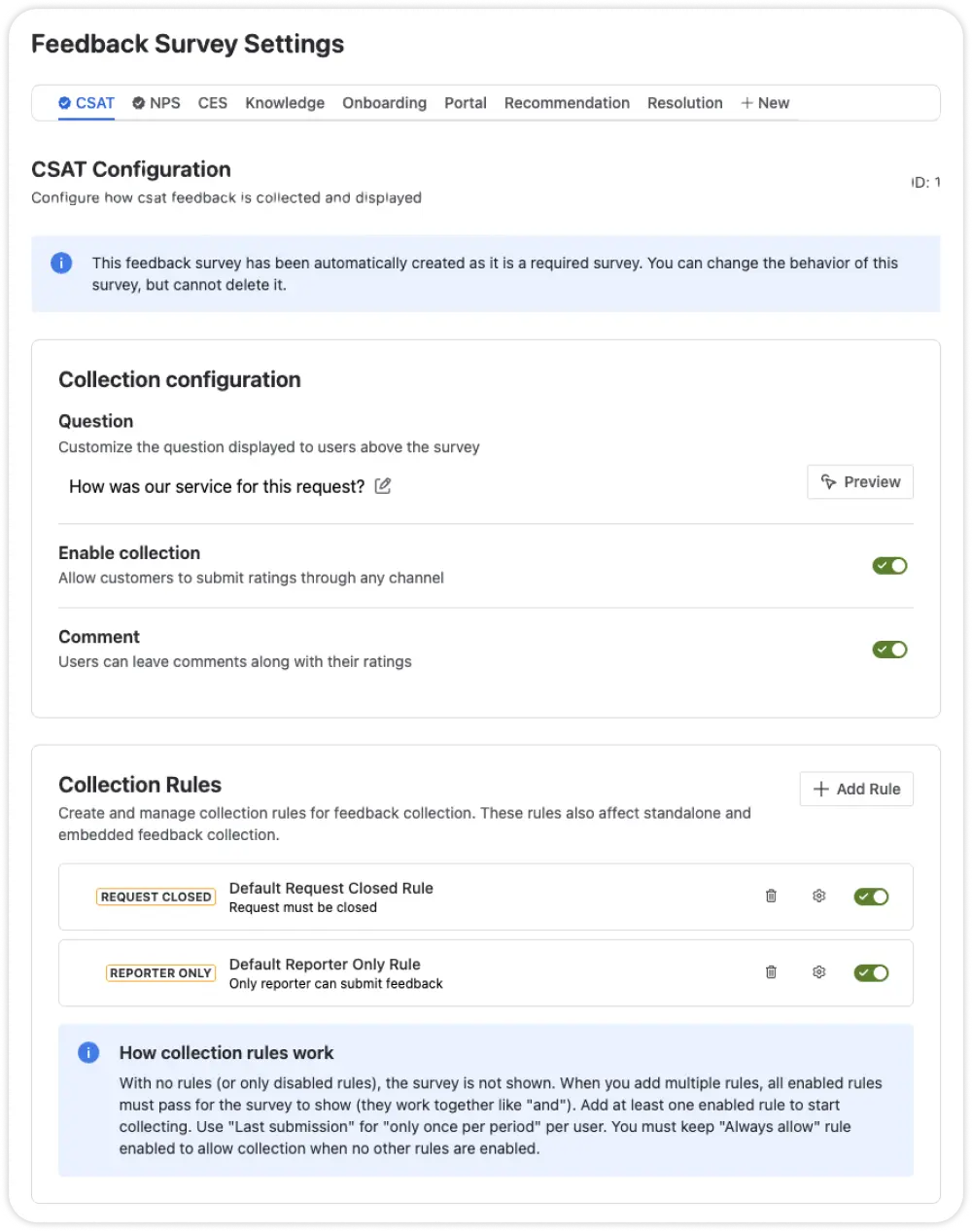
Setting up a custom feedback survey means five decisions, and three are permanent once you save — worth getting right the first time.
1. Name it something that isn't reserved
Custom surveys need a unique internal name using only lowercase letters, numbers, and hyphens. The names csat and nps are reserved for the built-in surveys, so something like ces or effort-score works. This name can't be changed after creation, so pick something your team will still recognize a year from now.
2. Write the question you actually want answered
The Display Text is the customer-facing label shown next to your score on the widget (e.g., "Customer Effort"). The Question is what the customer actually sees when asked to respond — this is where CES lives or dies. The standard framing is something like "How easy was it to get your issue resolved?" Avoid vague alternatives like "How did we do?" — that's a CSAT question wearing a CES costume, and it'll pollute your data with satisfaction responses instead of effort responses.
3. Pick a Field Type built for a numeric scale
You have three options: Rating (a star-based interface, good for quick and intuitive checks), Number Pick (customers choose a value from 0–10), or None (comment-only, no score). For CES specifically, Number Pick is the better fit — it's built for precise metrics like effort scores, where you want finer granularity than a star rating gives you and a real numeric value to average and trend over time.
4. Choose Request scope
Feedback surveys operate under three scopes: Request, Project, or Public. CES is a transactional metric — it's asking about the effort involved in this specific interaction — so Request scope is the natural fit. It ties each response to the individual ticket it came from, and you can still display the aggregate score on the customer portal or your own website if you want it visible. Like your Name choice, scope is locked in permanently once the survey is created.
5. Set the Calculation Strategy to Average
Of the available strategies — Average, Sum, Mode, NPS, Count, and None — Average is what you want for CES. It calculates the mean of all responses, which is exactly the "how much effort, on average, are we asking of customers" number you're trying to produce. This is the third and final setting that can't be edited after the survey is live, so double-check it before saving.
Triggering It at the Right Moment
A CES survey that fires the moment a ticket opens is asking the wrong question at the wrong time — the customer hasn't experienced any effort yet.
Collection Rules control exactly this. Before any rule can take effect, Feedback Collection has to be toggled on in the survey's Settings tab, and you need at least one active rule — if collection is on but every rule is off or deleted, the survey simply won't appear to customers.
For Request-scope surveys like this one, Request Closed is available as a trigger and it's the right one for CES: it fires once the ticket is actually closed, when the customer has the full arc of the interaction to judge — every reassignment, every clarifying question, every day it sat waiting. New surveys ship with a default "Always Allow" rule, which you'll want to delete once you've added Request Closed, so customers aren't asked before the request is finished.
Reading the Results
Once responses start coming in, the survey's Reports tab gives you the Total Responses count, the calculated Feedback Score (your running average effort score), and a Rolling Average Graph so you can see whether effort is trending up or down over time — not just where it sits today. The Feedback Volume by Rating view shows the distribution behind that average, which matters: a 6 built from a lot of 5s and 7s is a very different situation from a 6 built from a pile of 10s and 2s.
Scroll to Feedback Items for the individual responses and comments, filterable by date. When a high-effort response comes in with a comment worth escalating, the Actions menu next to it lets you create a linked Jira issue or attach it to an existing one on the spot — turning "this took way too many back-and-forths" into a tracked process problem instead of a forgotten data point.
The Takeaway
CSAT tells you if the outcome was good. CES tells you if getting there was reasonable. If you only track the first one, you'll keep missing the tickets that are quietly building toward a reopen or a churned account — because the customer was technically satisfied, right up until the third time it happened.
The setup isn't complicated, but it does take five deliberate decisions instead of zero. Name it clearly, ask about effort and not satisfaction, use a numeric scale, scope it to the request, average the results, and trigger it on close. Do that once and you have a metric CSAT was never designed to give you.
Myra centralizes CSAT, NPS, and fully custom surveys like CES inside your JSM project, with results stored directly in Jira instead of a disconnected external tool. Try free from the Atlassian Marketplace.